
Waypoint accuracy and inadvertent moving

I have only used Gaia GPS (on an iPhone 5s) a few times, so I'm still learning about it.
Recently, I did Add Waypoint (My Location) at the traihead (at my car, specifically), then hiked without recording and in Airplane Mode.
At my turnaround point I did Guide Me (to the trailhead waypoint), and then followed the guidance back to the waypoint.
When I arrived back at the car, the app said that I still had about 300' to hike.
I did not move the Waypoint. At least, I did not intentionally move it.
Is it possible this inaccuracy is due to user error somehow, or due to inaccuracy in the phone's gps?
I welcome any suggestions.
-

I'm sorry your waypoint was not set in the location you expected.
When marking your current location in Gaia GPS, I recommend tapping the crosshairs icon to force a GPS lock on your current location or waiting 30 seconds after opening the app to make sure Gaia GPS has time to acquire an accurate GPS signal before using the Add Waypoint (My Location) option.1 -
Nathan, thanks for the reply.
When you suggest tapping on the crosshairs icon to force a GPS lock, I assume that you are referring to my check of the location at the end of my hike, as opposed to when I set the Waypoint. Do I assume correctly?
0 -
I suggest tapping the crosshairs before setting your waypoint. This will help ensure that you've got a good GPS connection and that your waypoint will get set at the correct location.
1 -
Nathan, thanks for the 2nd reply.
To set the Waypoint, I tapped the crosshairs. I did not realize that there was another way to set a Waypoint, but then Gaia GPS has a lot of features and even after watching a video tutorial, I have a lot to learn about this wonderful app.
So, given how I set the Waypoint, is it your assessment that my phone is giving Gaia and/or me incorrect GPS locations, either when setting the Waypoint or finishing the hike, or both?
0 -

reviewboy1,
I'm a heavy user of GAIA, let me try to clarify things. I think what may have happened is that you "created the waypoint at your location" before your phone was locked onto the satellites skewing the position. I have noticed what you are describing on Android phones on initial startup IF I hurry on first startup.
Nathan is suggesting that on initial startup to wait and / or tap the cross hairs allowing you to verify first that the phone properly displays your position.
Then, step 2, "create waypoint at location".
FYI, on android, tap "trip" then tap the upper right screen symbol to see the GPS location resolution. I expect Apple is the same.
1 -
jpurdy, thank you for the detailed reply!
It is true that I set the Waypoint soon after launching the app, so it makes sense that is the problem.
To make sure that I am completely clear as to the instructions, I think you are suggesting:
- tap cross hairs;
- choose Cancel (because in the Cross Hairs screen I can't see the map)
- visually verify that my location looks correct, per the 'arrow head' thingy. This is easiest if my location is near a landmark on the map such as a road or trail
- if my location looks correct, then tap Cross Hairs again to re-enter its menu
- tap Add Waypoint (My Location)
- also, verify precision by tapping Trip -> upper right icon (circle with two arcs below it). After all, if precision is not good, then I would not expect results to be exact
Do I follow correctly?
Just now I closed, then re-opened, the app and immediately checked GPS accuracy a few times. Within a few seconds, the reported accuracy improved from +- 33' to +-16'. Thanks for educating me about checking that.
0 -
Don't make it too complicated. From your list above, first do #6 then #5.
2 -
Ok. Thanks, jpurdy.
0 -
@reviewboy1
It sounds like you have the crosshairs icon and the Create menu switched.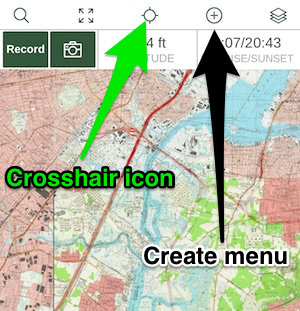
The crosshair icon will turn red after tapping it to indicate that the main map will be centered on your location. The Create menu is where you will have the option to make a new waypoint, route, or download an offline map. Check out these articles for more information:
1 -
Oh my, you're right! How embarrassing. Thanks for catching my error!
I will read through the two links you gave me.
Obviously, I need to re-watch the video tutorial that I looked at a couple weeks ago.
0
Please sign in to leave a comment.
Comments
10 comments