
Hide most tracks on GaiaGPS.com?
Répondu
I have been a happy user of the GaiaGPS app on my phone, and have imported a number of tracks. A LOT of tracks.
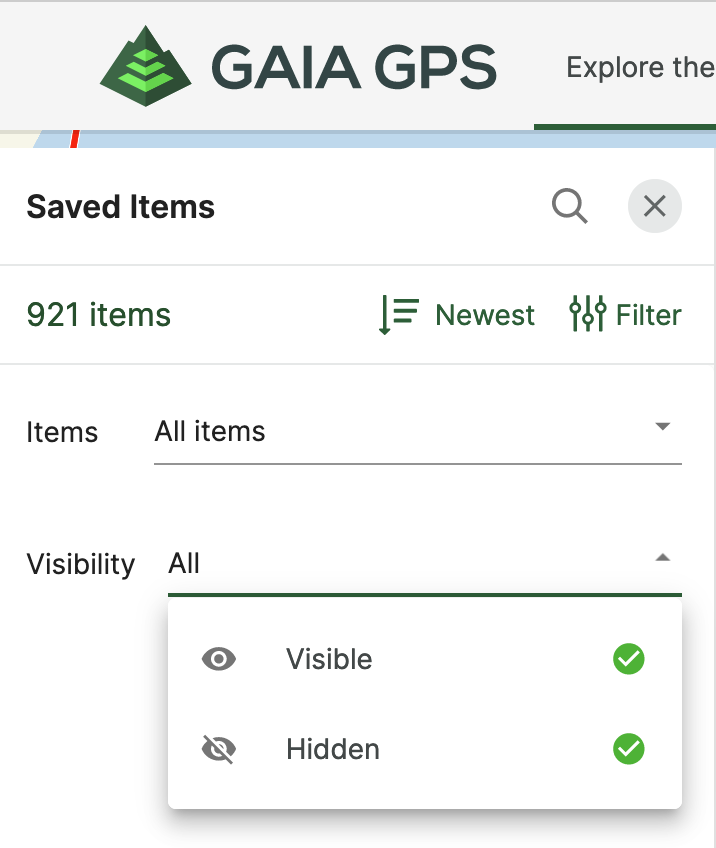
My Saved Items now has 921 items with a mixture of tracks and photos. Since I mostly walk around the same property, I have tons of redundant tracks that obscure everything.
I want to hide them all, then turn on selected tracks. I see the Filter options for Saved Items, but they don't seem to do what I want. If I click Hidden, then click Apply, the map doesn't change (that is, the tracks aren't removed/hidden from the map.)
How can I make all the saved items hidden in one fell swoop? Thanks.
-

Hi Rich,
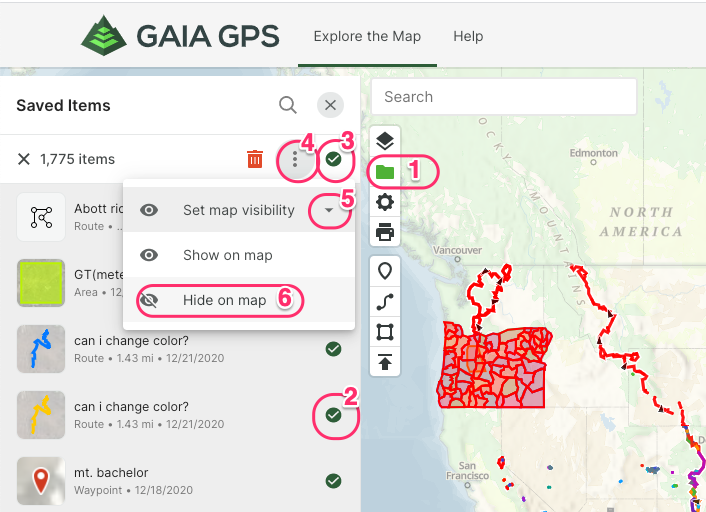
Here's how to select all your items at once and hide them from the map:- Click the Saved Items icon (folder).
- Click any item's circle to select it.
- Click the open circle under the 'x' to select all items.
- Click the three dots for more options.
- Click the down arrow next to "Set map visibility".
- Click "Hide on map".
If you have any further questions, please contact Support here.
1
Cette publication n’accepte pas de commentaire.
Commentaires
1 commentaire