
Gaia GPS 2026.4: New layers menu is a step back

I just updated to Gaia GPS 2026.4 (iOS) and I'm not really excited about the new layers menu...
I do not use layered maps (disabled in settings), but I switch between a few layers frequently. Previously I could just tap the Layers button, tap the layer I needed and done.
The new menu on the other hand takes up half the screen and I can't even tap another layer without scrolling because of huge white space and a massive “Add More Layers” button that is permanently over the list. Even worse is that tapping the layer no longer works. It just opens a preview. I now have to precisely tap the toggle switch to select the map.
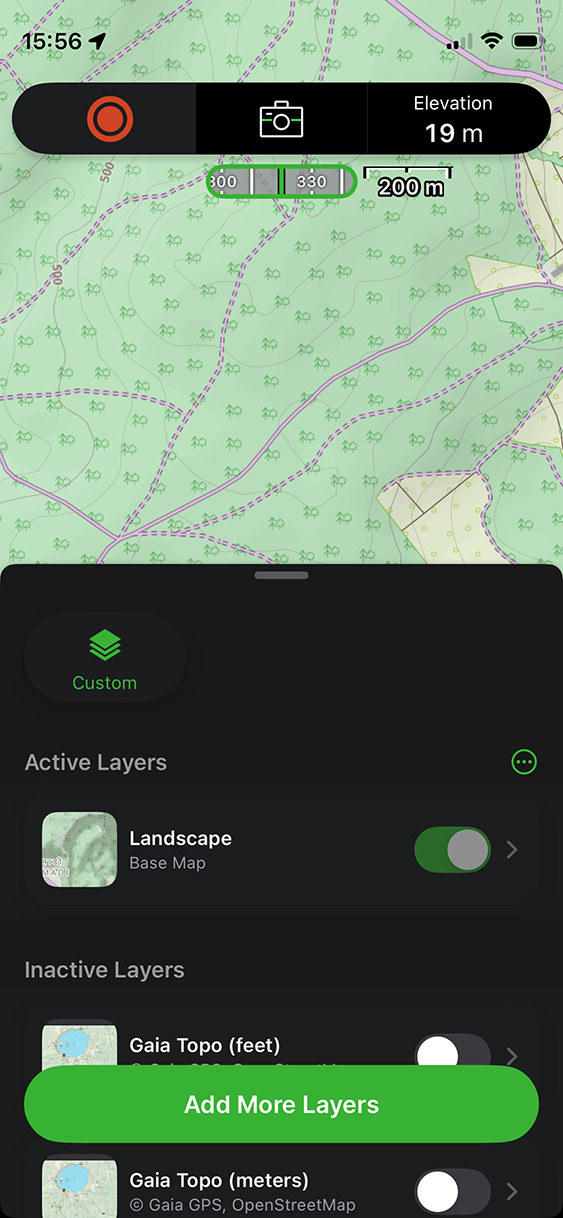
I understand that the toggle switches can be useful when working with layered maps, but when using the menu simply to swap between map sources it is very inconvenient.
I also think the “Add More Layers” button would be better positioned at the top or end of the list, but not over it.
And why is my Layers button/menu now called “Custom”? What is custom about it?
-

Hey there! We're in the process of rolling out Adventure Modes to all users in the app. The new UI you’re seeing is only a part of the full update. Within the next few days you should see the rest of the updates to the layers menu come through. If you have any issues let us know! https://help.gaiagps.com/hc/en-us/requests/new
0
Post is closed for comments.
Comments
1 comment