
Can’t access map on Gaiagps.com from iPhone
Answered
I’m trying to access my maps on gaiagps.com (via safari browser) but keep getting back to the main screen telling me to download the app. I have the app, but since I can’t see public tracks on the app, I was trying to use the desktop version (via my phone) to access this information. Can anyone help me: 1. Access the Gaia desktop site via safari on my phone 2. Is the only way to download public tracks still do add them via desktop? I’m looking for backcountry ski tracks so searching trails doesn’t really help me. If I can’t resolve this issue, I’ll be switching to Caltopo as it’s the main reason I use Gaia. I don’t always have access to a desktop computer so accessing this data through my phone app or web is crucial
0
-

@sbs105,
Sorry for the trouble accessing the map in your mobile browser. I can see how this is needed given that public tracks are currently only available online.
These steps should help:- Open Safari on your iPhone
- Go to gaiagps.com
- Tap the three lines in the top right corner
- Tap Log In from the dropdown
- Log in with your Gaia GPS account email/password
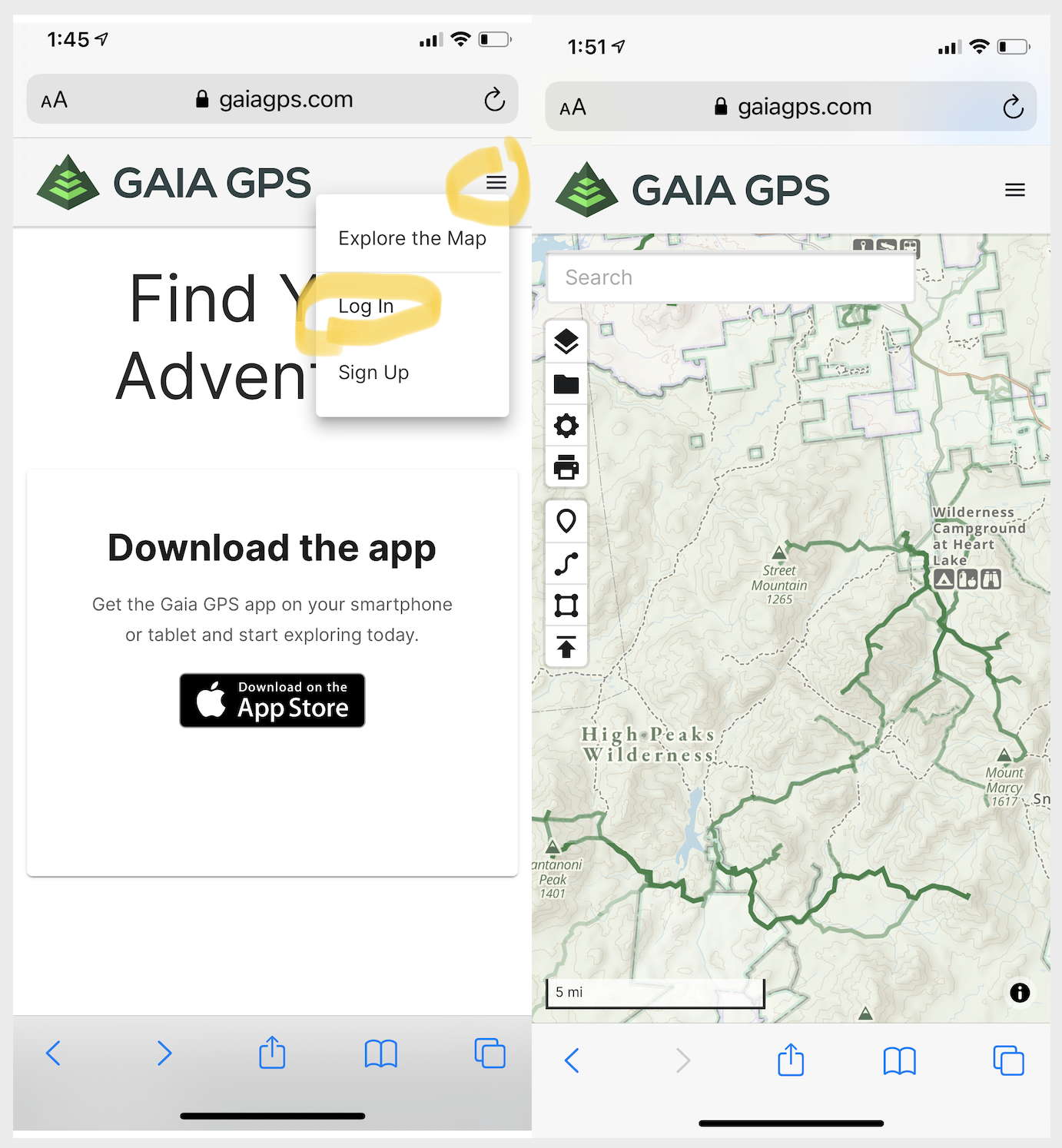
If you have any other questions, please contact Support here.0
Post is closed for comments.
Comments
1 comment