
"Sharing Icons" for a Public Waypoint are missing

In the browser version, the Help menu instructs me to use the icons to share a waypoint (Facebook, Twitter, URL, or embedment). These icons do not appear on the page I am attempting to share (see screenshot below). Why not?
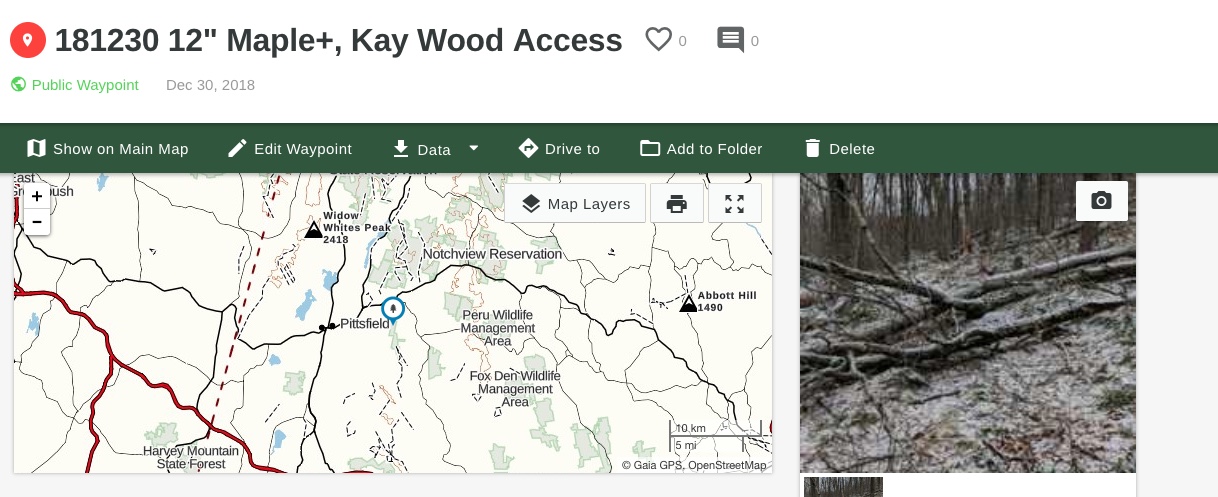
You know, the Android version mostly works, and I've seen videos of the I-Phone version working pretty well. The browser is clunky, inefficient, and inconsistent. Despite numerous posts and complaints little seems to be done to address these glaring deficiencies. I understand that the goal of the app might be to make a mark in the social media--this is not particularly helpful for $ubscribers like myself who use this primarily for work. This software is so close to being a great product...but it's looking like it's time to pull the plug, sadly.
-

I'm sorry the social sharing icons are not displaying on the data summary pages for your waypoint. Can you let me know which web browser you were using in the screenshot so I can look into this?
While I look into this, I recommend using Chrome to share your waypoints from gaiagps.com or sharing them directly from the app (Android/iOS).
0
Please sign in to leave a comment.
Comments
1 comment