
Map tiles don't paint

When using the web browser version of Gaia GPS, map tiles don't always paint. The work around is to scroll out, then back in. After a while, this gets to be a little annoying :-)
My browser is Chrome, and I have a high bandwidth pipe. I've verified this using multiple client machines on multiple networks.
Example attached.

-

Having same problem
0 -

I have the exact same problem, but it occurs on my Nexus 10 tablet. Kind of a pain to keep scrolling in and out just to keep the map working.
0 -

I'm sorry the map tiles are not loading correctly. I have opened a bug report for this so we can take a look at what the issue is.
0 -

I'm seeing this too. It's why I stopped using Gaia several years ago, came back to see if this was still the case. What I've noticed, is that it is much more likely to happen at trail level of high use areas when using the default Gaia Topo.
Switching to another map type will usually help. Yet, now I'm using a map I don't really like.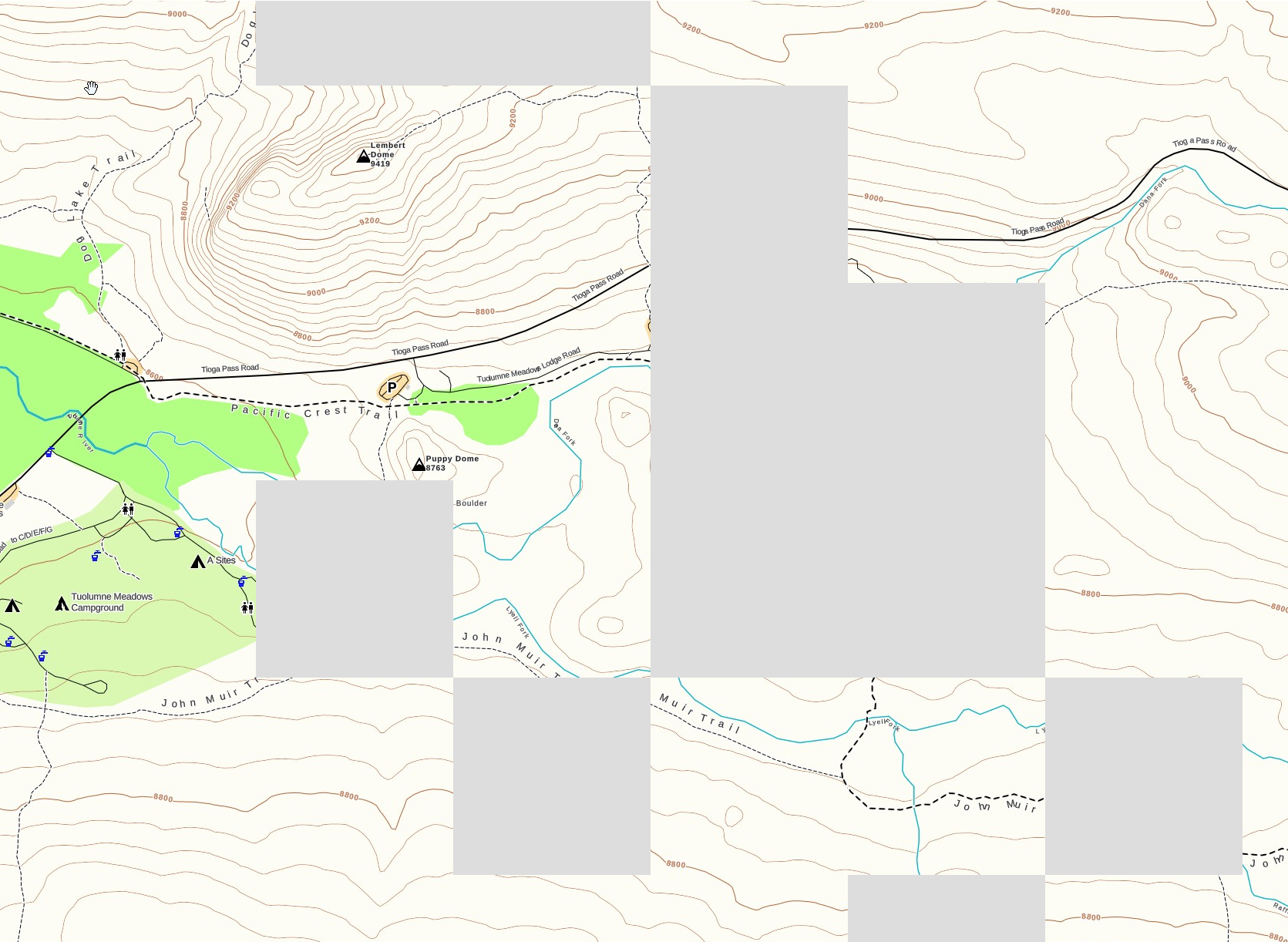 0
0 -
@Bean
I'm sorry you are having an issue viewing Gaia Topo. We are working on a large backend update that will improve how the map layers on gaiagps.com are displayed and rendered.
We are shooting to finish this project by the end of this year.0
Please sign in to leave a comment.
Comments
5 comments