
Undo, please

I was editing a cycling route on the desktop. I had put many waypoints in because Gaia would not map the route correctly otherwise. I think that I tracked this down to 'disconnects' on the roads. If I am correct, there are many places where the roads are not connected. I can force the connection (again, //apparently//) by putting a waypoint at the intersection and another on the road that is apparently not connected.
Once I had the route, I thought to delete the extra wauypoint, and that worked up to the point where I deleted a waypoint and half my route disappeared. I could not find 'Undo".
-

I'm sorry there was an issue with the route you where working on.
Unfortunately, there is not an “undo” option. Sorry about that. However, can you click 'Submit a Request' above to contact the support team, and include a copy of your route and the coordinates of the area where Snap-to-Trail was not working so we can take a closer look?-1 -

In the IOS version, you can DUPLICATE your route. While not exactly the "Undo" feature you're looking for, to avoid losing your original route you could DUPLICATE your route before attempting any edits. In fact, if it were an extensive editing process, it wouldn't be a bad idea to save your changes periodically and then DUPLICATE the edited route again.
John Holmes
0 -

Trying to create an error-free route without an undo option using an error-prone snap-to-trail function is infuriating.
1 -

Hi everyone,
I'm sorry for the frustration with the Snap-to-Trail routing feature.
You can correct a snapped route by dragging and dropping your points to a new location. You can also delete any of the route points by clicking on them, then selecting the 'trash can' icon.0 -

I also think it should have an UNDO button. I realize the workarounds but it's not as good.
0 -

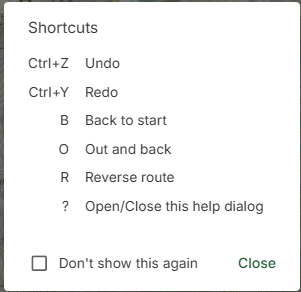
The help page very specifically says there is.
Either add undo or fix the help page.
 0
0
Please sign in to leave a comment.
Comments
6 comments