
filing a subfolder back up to top level my folders

new user here. Accidentally filed a folder into another, but can't figure out how to move the subfolder back to the top level "my folders". this is on gaiagps.com.
-

You will need to create a new folder for the data on this page, https://www.gaiagps.com/datasummary/folders/, and then move the data over to the recently created folder. Once the data has been moved, you can delete the old subfolder.
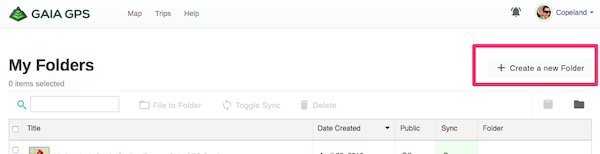
If you want to remove it completely from any other folder - you can do that in the app.
1. Open the details page for the subfolder
2. Then tap the down caret next to the name of the parent folder
3. select the “Remove from Folder” option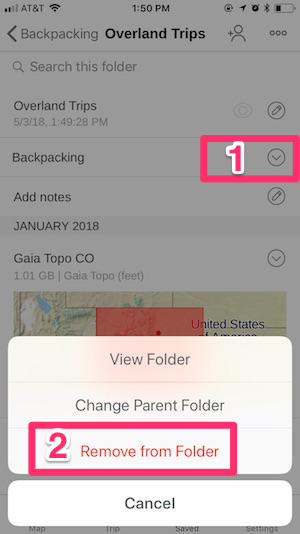 0
0 -
ok, thanks. I feel a little better, what you describe is what I did. Consider it a feature request then to move a subfolder up to be a top level folder, along with all the other "make folders better" feature requests I've read about.
1 -

Yep, ended up hacking until I came up with the same solution.
When already in a Folder --> the option of "File to Folder" is one of the culprits.
Should read "Making a Sub-Folder".
Also an option of "MOVE FOLDER" would solve the problem. One could MOVE a FOLDER to the Root or into a Sub-Folder, etc.
1 -

"Remove from Folder" is not presented as an option on my iPhone, only "delete:"
1 -
@hilberman
The “Remove from Folder” option can be found by following this steps:- open Gaia GPS > Saved > select the track, route, or waypoint you want to remove from a folder > tap the down caret icon next to the name of the folder on the details page for the data > Remove from Folder
0 -

Wow. Five years on, and I come looking for this function and find that this basic feature has not been added. I wish we'd get the blocking and tackling done right before moving into more "marketing forward" new features like Map Packs (beta) which was too buggy to use. Awesome, I have 16 pages of routes to move manually, page by page, into a new folder at the root level. Wow. Priceless.
Oh, and speaking of moving pages of data. Why, when I use the "master" checkbox next to the title label to select all 20 items on a page, and then I perform a function like File to Folder or Delete, and then when I go to the next page, WHY OH WHY is the master checkbox still checked? But none of the 20 items are selected? So I have to toggle it off and on again to actually select them adding needless clicks. That's what i mean by blocking and tackling people. That's just sloppy. And it's been that way for a LONG TIME. SHEESH. Kinda embarrassing that stuff, no?
Here's a thought: when I advance to a new page, how about having that box unchecked? Or, and this might be WAY advanced, since my actions suggest I'm in a mega edit mode, when I switch to the new page, the master checkbox could be checked and, wait for it, all 20 items on the page pre-checked with the assumption I'd like to perform an action on all of them! But having the boxed checked with nothing selected is just wrong, illogical and oh, why bother.
2 -

@5stone Yeah, I just had the same problem; you'd think after FIVE FREAKING YEARS they would fix a silly little problem like this.
I'm a software developer, working as one since the 80s, and in my whole career, I would NEVER leave something like this undone for a week, let alone FIVE YEARS.
What are this app-developer's priorities, if they can't fix a basic - and I mean REALLY basic - feature like this.
Add to this strange tweaky behavior, like changing a waypoint name SEEMING to take effect, but then when you open it again, it still has the old name... I mean, who writes this stuff? The app on the phone works well, but both the app's and website's ability to organize things is Kindergarten-level programming!
DEVELOPER'S : FIX THIS AND ALL THE OTHER TWEAKY PARTS OF YOUR APP! THESE SHOULD NEVER EXIST IN A SUPPOSEDLY MATURE PRODUCT!
1 -

I've been a Gaia GPS user for many years. I love it and hate it. This app has such amazing potential but I always feel like it is being neglected by it's developers.
I accidentally nested a folder full of waypoints under a completely different folder. It is truly amazing to me that after all these years there is no good way to undo that mistake.
And lots of other ease of use issues that never seem to get fixed.
And the support pages on this site are so un-useful and incomplete.
I've about had it with Gaia.
8^(
0 -

Why Gaia file and folder management is sooo unintuitive is beyond comprehension. EVERY other app I've EVER used has ALWAYS offered obvious and reliable methods of moving files, deleting (vs archiving) files and folders, nesting folders and unnesting folders. Why Gaia can't provide a normal file/folder structure - and why they haven't addressed years of complaints - speaks volumes to their disregard for satisfying the most fundamental of user needs.
1 -
@paulgarvey99 My post above was 2 years ago, but I've recently been having a lot of trouble due to Gaia going nuts when you upload a large GPX file. I have maybe 6000 waypoints in several different GPX files, and uploading them and organizing them causes Gaia to do things like place them all at the top level, or some at the top level and some in the target folder, or spitting out a "Something went wrong" error, but leaving things in a terrible state.
I've been emailing back and forth with Gaia support, and the support person seemed to think that this was an okay state of affairs. Convincing him that folder and file organization and management being completely unreliable, unpredictable and error-prone was actually a bug. His advice was along the lines of "Well, don't upload so much data" (6000 waypoints is not a LOT at all by modern data standards), rather than admitting it was a bug and that they should fix it.
He eventually told me he submitted a bug report to the developers. :-/
0 -
To add to the frustration, I just added up all the clicks it takes to import a waypoint from my workstation (this is all part of database management so bear with me). 14 clicks plus a scroll. Yep. The scroll is needed to find the folder you want to reassign the waypoint to AFTER it's saved because you can't tell Gaia where to save it beforehand. The clicks also include having to delete the folder that Gaia likes to wrap everything in rather than simply importing just the waypoint.
But wait. There's more.
It would seem that the latest Gaia version has eliminated the DELETE function. ARCHIVE appears to now be the only method of removing data. But ARCHIVE doesn't delete. It hides it in another area in the event we decide we need it later. To delete the items in ARCHIVE that takes a whole new series of clicks to navigate to and purge the ARCHIVE folder of things you never wanted saved to begin with.
I know a few 14 year olds who could solve these OS 101 issues.
1 -
@paulgarvey99 Ha! Yeah, the GUI is so badly designed, and slow, and infuriating. I was surprised when I saw that the delete function had disappeared. I guess rather than add a "A you sure you want to delete this?" popup, they decided to make it put things in Archive so you have to be sure you want to delete it. A silly decision indeed.
0 -
So... Have any of you folks done any research on GPS mapping apps that have this kind of functionality but are written by developers who care and have the skills to pull it off?
I depend on this (Gaia) app but would love to dump it if I found a different one that was well done.
0 -
@mjb405 Most people seem to use Gaia, or OnXHunt, or Avenza. And most people keep coming back to Gaia, despite its problems. I don't think there's anything that does everything I want and which is also really well-designed, unfortunately. But good luck finding one, and report back if you do!
0 -
I've used CalTopo with great results. It has a broad SAR and first responder user base so with that crowd it better work well.
I'm not aware of anyone returning to Gaia after bailing. Reference the other posts re: the disastrous release this summer that required an unannounced sign in to re-access your account. Many outraged users stranded off-grid with an app that's design to work off-grid. It's just another example of how Gaia's priorities don't appear to be user centric.
A growing audience believes Gaia is banking on their app being too sticky to churn. Not for as long as their export function works.
0 -

Gaia is an excellent program, but its folder management is cumbersome, counterintuitive, inefficient, and almost useless, I wish they could fix that, or just get rid of it altogether by moving everything to the root directory and throwing away the entire folder system, they would save us a lot of time and frustration.
0
Please sign in to leave a comment.
Comments
16 comments