
Gaia won't follow trail when creating route

I've been using Gaia for a couple of years now - no problems until today. Gaia acts as I've got the 'straight line' enabled instead of 'hiking' mode and will NOT follow the trail for a route I'm trying to create.
I'm not sure what settings to check.
-

Same here. Really frustrating. Tried every setting and removing layers and still won't work.
0 -
I swear this just started.
0 -

I'm having the same issue even on a trail that I had previously created a route on with no problem. I'm using the right layer and have it set to Hiking mode.
0 -

I just purchased this app today I have watched loads of tutorials and I am doing the same thing as they are doing on the tutorials and I can't get it to snap. I have made sure I'm on hiking and only have the layers set to Gaia Topo. Just will not snap no matter what trails, roads or anything else. Very frustrating!
0 -

Same here. It's really depressing
0 -

Same issue here, just started noticing this the past couple days. Previously I had no issues getting the route to snap to the trail.
0 -

The Create Route feature in Gaia is useless (that's the nicest term I can think for it). As others have observed, it frequently will not snap to the most obvious route. I've had it snap to a route that was miles long when I clicked on a point, when that point was less than 1/2 mile away along a trail, with no way to change it.
Additionally, sometimes the tool will snap to a trail, while other times it does straight line.
Lastly, unlike what their popup says, Ctrl-Z will NOT do an undo. You must click the Undo button on the screen.
I've only tried creating a route today, 10/25/2022. In reading other comments, and given the timing of the recent Create Route "update", I'd guess that this update introduced numerous bugs into the feature.
If GaiaGPS cannot fix its Create Route feature, I will not renew my premium subscription and will look for an alternative.
1 -

Same issue here. Trying to create a route using 2 connecting trails in my desktop browser. The first trail is snapped to but it skips the connecting one and draws a straight line to the end instead.
0 -

New user here (but many years TopoMaps+) ; same problem creating driving route on forest roads. Snaps to road ok but backtracks to nearest hiway access , snaps to it for many miles then back into forest road at nearest access point to complete the route to destination.
unbelievable bad code work and then to release it anyway . . . ?
R
1 -

7/30/2023. Same Damn Problem. Do I need to switch over to OnX? This used to work all the time. WTF, who is running the show?
0 -

Tried using the app today. STILL wont follow the route. No fix?
0 -

Looks like this problem is back. What do I do? Right now this is unusable ... I may as well be using AllTrails.
0 -

Yes having the same crazy problems and end up with strait line all over the route.
Cant undo or delete them.
All the work I did creating the route is wasted and useless.
This is a major fault with the Gaia program, makes it unusable, especially for areas where there are not many uploaded tracks0 -
I've not stopped using Gaia as it simply does not have working feature for this.
In the USA some people can get around it by using other peoples tracks, but in the rest of the world GAIA does not have these tracks, so it does not work.
Such an oversight and shame and from what I can see its been a problem for many years but not taken serious by GAIA0 -

Same issue a year later. Come on, Gaia. Can you say when this will be fixed. Using ipad/IOS with latest version of Gaia.
1 -

Ridiculous issue, and it's even worse. Gaia Topo map layer is activated. I've used this for years. It's completely worthless now. Outside ruins everything.
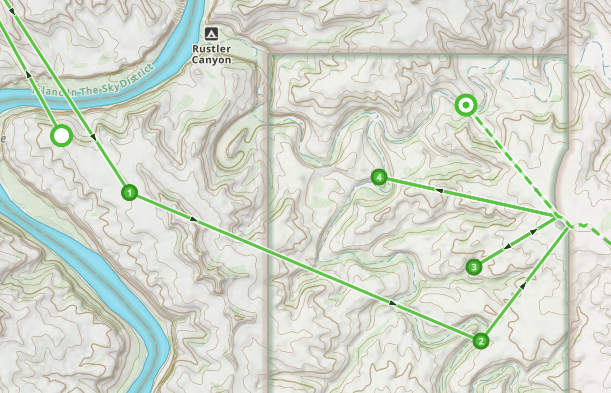 1
1 -

Since you're using Gaia GPS Premium on iPhone, the straight-line segments are almost certainly GPS recording gaps, not a routing setting. Gaia records tracks as a series of GPS points; if iOS stops providing location updates for a while, Gaia simply draws a straight line from the last point to the next one it receives.
The two settings that fix this most often are:
-
Settings → Privacy & Security → Location Services → Gaia GPS
- Set to Always
- Turn Precise Location ON
-
Settings → General → Background App Refresh
- Enable it for Gaia GPS
Also make sure Low Power Mode is OFF while recording. Gaia support specifically recommends this for track-recording problems.
A surprisingly effective fix that Gaia support has recommended for iPhone GPS glitches is:
- Change Gaia location permission from Always → Never
- Exit Settings
- Go back and change it Never → Always
- Then restart the iPhone
This resets iOS location permissions and has resolved straight-line recording issues for a number of users.
0 -
Settings → Privacy & Security → Location Services → Gaia GPS
Please sign in to leave a comment.
Comments
17 comments