
All street maps seem to have the same error

One of the ways I use Gaia is to plot my school bus runs. Recently I was in a neighborhood and found an error, but the strange thing is that it is on all of the maps.
When I go to 38.07500, -78.47197 I see that Squire Hill Court goes through and Castle Court does not. This is what I see with the Google Roads overlay, MapBox Streets HD, Gaia Topo, ESRI, or USGS National Map which are the road maps available on Gaia.com. But, all of them are wrong. Squire Hill does NOT go through and Castle DOES. If I go to Google Maps it is correct, and Apple Maps has it right also. Outside of Gaia, this error does not exist. Within Gaia, it exists in every single map.
I can see one of the maps being wrong, but there is absolutely no way to route properly within Gaia if none of the maps show it properly.
Is Gaia really just that far behind on every single map? Is there anything I can do to get more up-to-date maps that I can use for routing?
-
I did more reading and conclude that Gaia relied on OSM for the routable info. I went to OSM and noticed that both roads were shown as connecting. I edited Squire Hill Ct to break that connection.
So, Castle was correct in OSM but that change had not been reflected in Gaia. SHC was wrong in OSM and I corrected it.
Now we will see how long it takes for one or both of these changes to make it through to Gaia, but that only addresses the routable layer. The map images are obsolete, also. Is there a way to request a Gaia map refresh for a certain area?
0 -

Hi @anton,
Gaia Topo, as well as several other sources in the app, are based on OpenStreetMap data, an Open-source and public mapping project.
Updates to OpenStreetMap will display at Gaia GPS in two to three weeks.Satellite imagery is updated at the discretion of the third-party map provider. We do update the maps as soon we receive updates from the provider, but we are not able to control their update schedule.
0 -
Thanks. I will watch to see how soon the changes I made in OSM show up in the various Gaia maps.
I tried the Google Roads layer again and it was correct, but when I tried to route through that area the routing followed the old, not-on-the-map, not-possible path. You can see it in the image below where I went from red to teal (should have gone via Castle but went across the grass at the end of SH), to the purple in the middle of Castle, and then to yellow where it should have continued on Castle but couldn't. So clearly the routable layer is different than the image that is displayed. Where does the routable layer come from with Google Roads, and how does it get updated? When I go to Google Maps, the routing is correct.
I just want to know how to get accurate routing. Backing a bus all the way down Squire Hill wasn't fun.
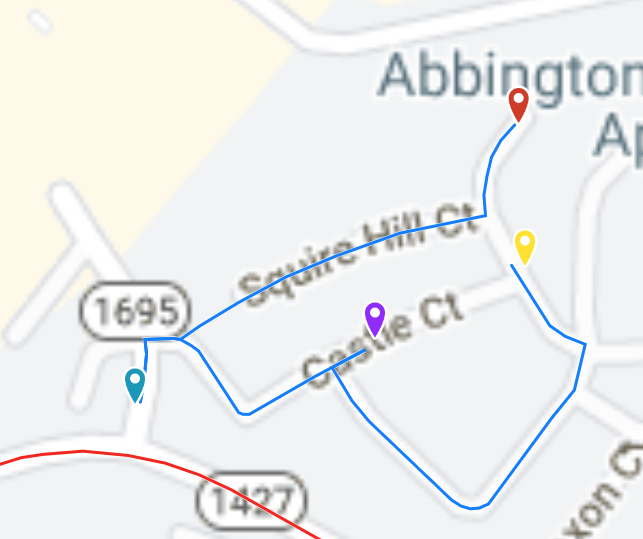 0
0
Please sign in to leave a comment.
Comments
3 comments