
Certain roads shown on USFS 2016 MVUM map are shown on Gaia GPS but do not snap-to-track

I'm using GAIO premium with Windows 10. Some roads that appear on the USFS 2016 and MVUM maps do not appear on Gaia Topo. I've attached an image showing what I see on Gaia GPS: I can't snap-to track on the roads in the center between the two marked waypoints. I am using an overlay of the USFS 2016 (on top) with Gaio Topo and then MVUM. If I remove the FS2016 and MVUM maps the gray roads in the center disappear - they are not on the Gaio Topo.
The roads are shown on the MVUM map and the USFS 2016 map. They are not shown on the USFS Visitor map, the USGS Topo map, or the Gaio Topo map.
On the hypothesis that the MVUM map is the definitive map for motor vehicle use and that there might be a gap somewhere in the mapped roads, I tried to establish routes using only various segments of the problematic roads. But when I try to establish any route that uses any portion of those gray roads in the center, all I get is a straight line between waypoints. It’s as if the roads do not exist and I’m mapping an as-the-crow-flies route across wilderness.
Will appreciate any help! 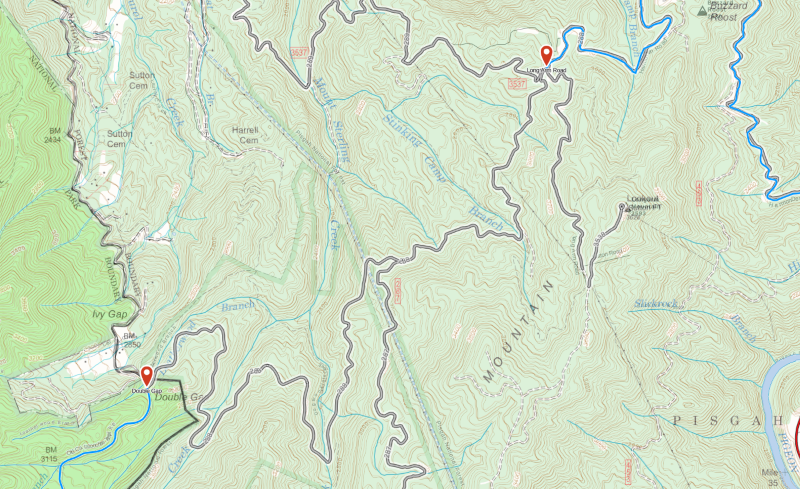
-

@rwpattonstl
Snap to trail only works with trails that appear on Gaia Topo.
Gaia Topo, as well as several other sources in the app, are based on OpenStreetMap data, an Open-source and public mapping project.
You can actually contribute to OSM in order to add trails and features to the map. Read more about this and find instructions here: Contribute to OpenStreetMap
If you decide to contribute any updates to OpenStreetMap, you'll see the changes in Gaia GPS in two to three weeks.
In the meantime, when creating a route over trails that aren't displayed on Gaia Topo, your best bet is to use the straight-line routing tool.0 -
Thanks much, Jim. After I've driven the roads in question I'll contribute the result to OSM.
1
Please sign in to leave a comment.
Comments
2 comments