
Why is there no legend on the Maps?

Yeah I've read all the old posts. There is still no legend available on the desktop map or when I use the Android App. I have read that I should be able to double click the route and that doesn't work. It just zooms the map in. I should not have to open a new window on the desktop and go search for a map legend when trying to plan a route.
Sorta like putting the on switch for the car in the trunk.
And I don't get the colors on the MVUM. They don't match anything the Forest Service lists.
What is the point of this software if it doesn't give you the information you need to find trails and map routes?
These are simple issues. Maybe there is another project I need to look at.
-

@Roktgr
I'm sorry you are having trouble getting the information you need for the MVUM map.
Currently, the map legends are available in the help center here: https://help.gaiagps.com/hc/en-us/articles/115003639928-Map-Legends
You can also access this in the app by tapping Settings> Help > User Manual> Search 'Map Legends'
Tapping a route for more info is available in the iOS app and we are working on a big under the hood improvement that will allow us to add features like this to maps on gaiagps.com and the Android app0 -
Thank you for the reply. It is just frustrating that such a simple essential map function is only available through 5 different menus. Look forward to the update.
1 -

Having a web page to look at is totally useless when I'm driving around and want to jump on a trail. The MVUM color codes the trails, but I have no idea what those mean. I should be able to identify what type of training I'm looking at from your app without having to log onto the internet and view a web page to figure it out.
I followed the instructions that you provided above and got no usable information.
I downloaded the app yesterday and am already frustrated enough trying to learn how to use it that I am considering tossing it out and demanding a refund. Could you at least point me to a good source for learning how to use your app? It seems that part of the equation seems to have escaped you. Yes, some of us would like to learn how to use it.
If the features that make Gaia useful are available on IOS, but not android, you probably shouldn't offer an Android version.1 -
@bsquared1
I'm sorry you're having trouble getting started in the app - I sent you an email with some more information to help you get set up.
The MVUM (USFS) overlay was updated to look more like the maps the USFS supplies. Here is the updated legend for this map source (you can also find this on the Map Legend Help Center article):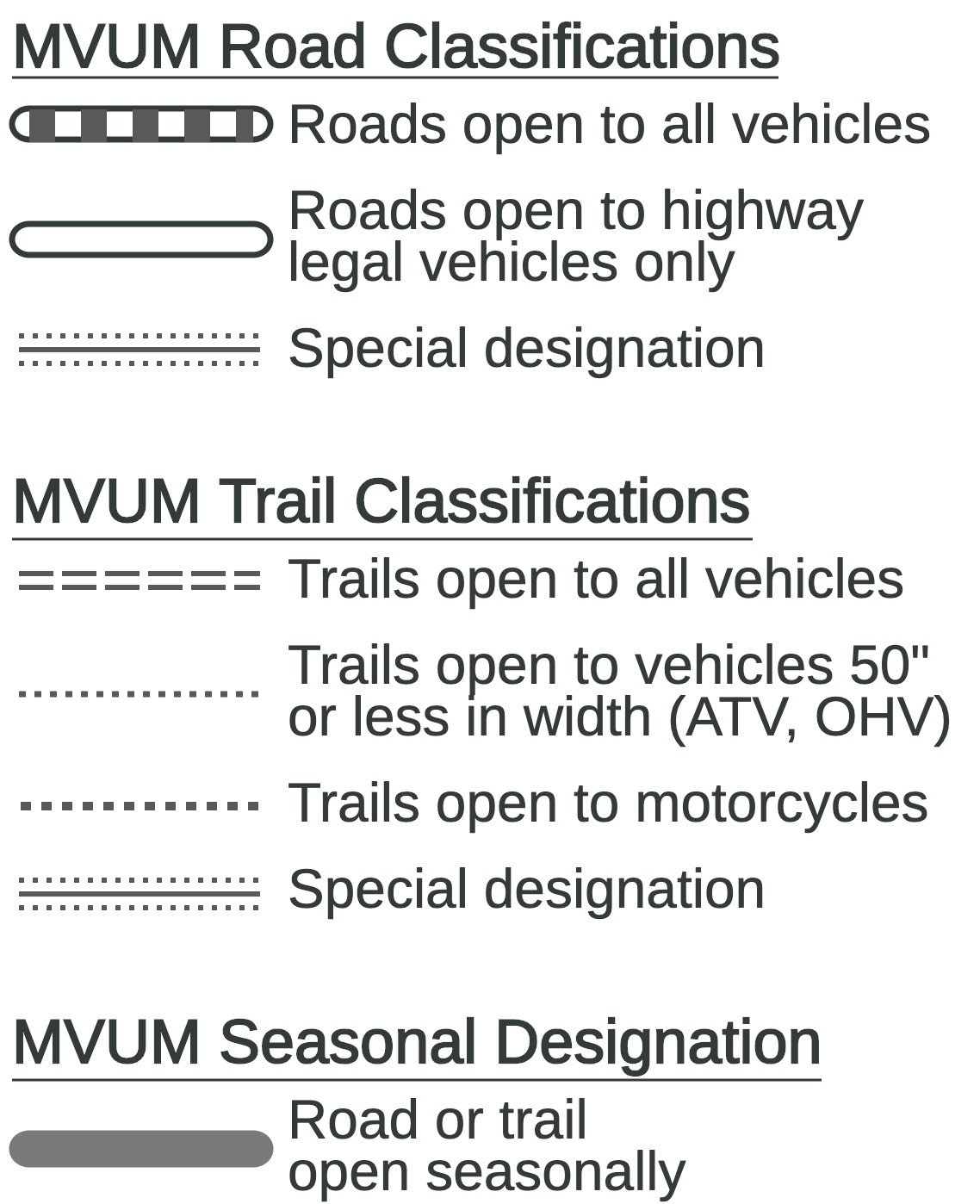 0
0 -

Ive noticed that when using Gaia on my desktop web browser I can see a map legend by hovering over that map in the map layers selection window. That is useful, thank you! Is there a similarly updated way to view the legend on Android?
0 -
@TroySmith80
Glad you like the new link to legends from the layers menu. Currently, these quick links are not available in the Android app but you can access them from the Help Center.0 -
Amazing that you guys don't get that finding the Legend from the "Help Center" is anything but helpful. And it's such a simple addition but yet 8 months has gone by and still have the same excuse and response.
1 -

The maps are good. Your legend don't meet first grade level. Web page on any searches sucks. Guess we will go back to Garmin and DeLorme for reliable info. Your excuses are not sufficiant for a reliable for product. Thank god you don't give this to us is the theater of operations.
0 -

Can we just get a button on the map page that takes us to the legend, like the screen shrink and expand button? Just keep it simple. I see the link to the legends but it is not zoomable on an android, I can't read it, so it's unusable.
3
Please sign in to leave a comment.
Comments
9 comments