
Download speeds impossibly slow

Trying out my premium trial and testing downloads for a cross-county trip later this year. At this point, the entire app became useless to me and it is upsetting because this app looked so promising. With all the tile limits and incredibly slow download speeds, I see where it would be impossible to download the maps I need. I am using the android version on Wi-fi at cable speeds. The one USGS national map of a 1/4 of a state was downloading for 14 hours and still not even a 1/4 way done. I tried a very tiny Gaia Topo map, 870mB and it looks like that will take hours too. Really? Is anyone actually able to use this app to download off-line maps? I have a road nav app where I can download maps by state that have great detail, pois, street numbers, etc, minus the good stuff like topo features, but they downloaded zippy fast. What is with the Open Street Maps not be downloadable at all? This isn't a product if customers can't download like advertised.
-

i m having same problem for me it takes about whole day to download 900 MB when i got the app it worked ok for first map and now it is almost useless not only that i noticed whole app is slower takes some time to refresh i keeps freezing up
1 -

Same here. Careful though, they may cancel your membership after you finally get all the maps downloaded...
Hoping someone gets my message soon before the cancellation actually processes that they emailed me they were going to do to mine. I have 30+GB of maps that I was finally able to get downloaded...
0 -

Thanks for posting and I'm sorry you are having an issue downloading your offline maps.
@natureguyusa
Can you click “Submit a Request” to contact support directly? Please include the include a description of the area you are trying to download so we can look into this for you.
Unfortunately, the OpenStreetMap layer is not available for offline use due to their terms of service. Sorry about that. However, there are several layers such as Gaia Topo and Outdoors that are based on the same data as the OpenStreetMap layer.
@goranvolvo & @randallw201
I noticed you both also emailed support directly and my coworkers Robyn and Chris have followed up with you there. Please let me know if you have any other issues.
For future reference, offline maps will remain in your account regardless of your membership status. However, an active membership is required to access them.0 -

October 10 2023, I came here looking for information about why my iOS map downloads are SO SLOW.
Still a problem, friends, 5 years on.
"Outdoors" has been downloading for over an hour and is just over half-way done.
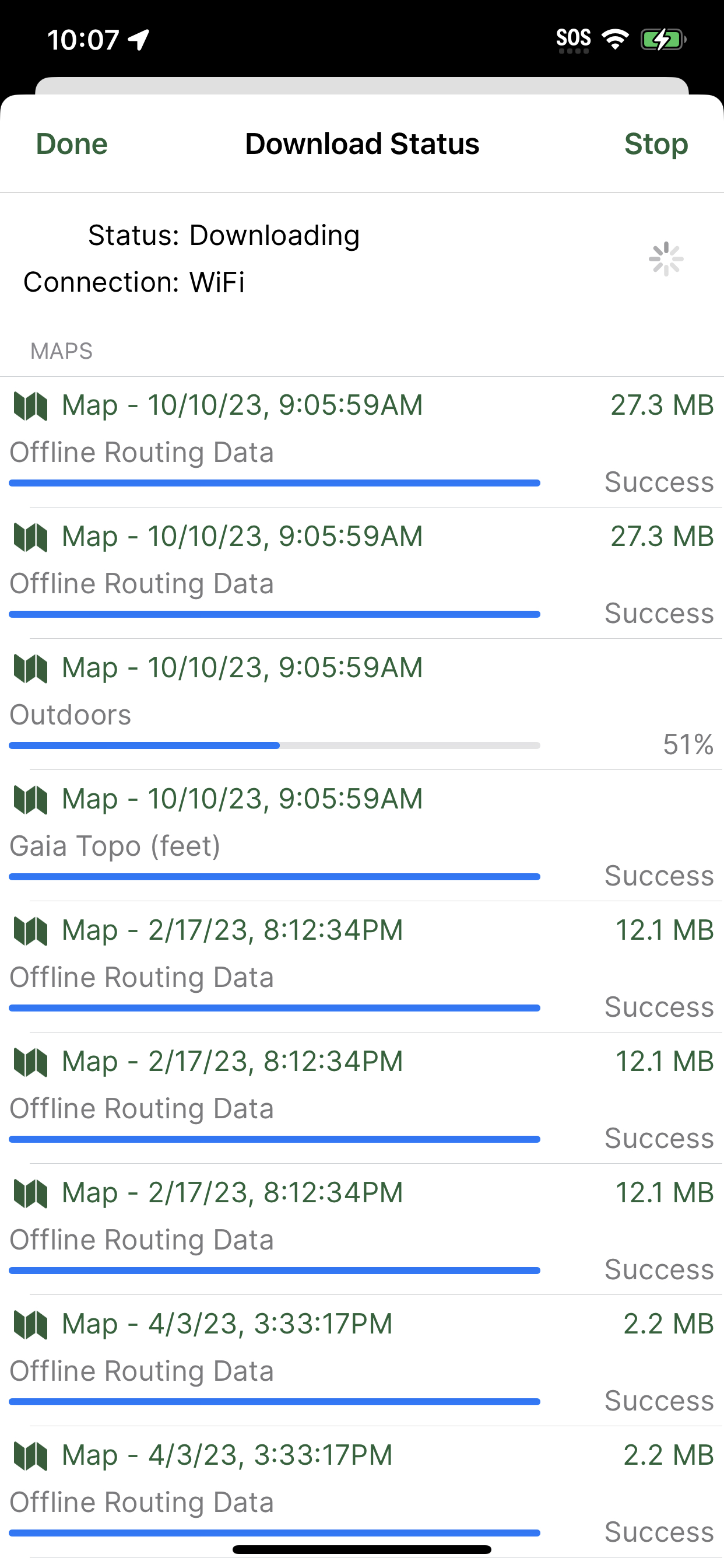 -1
-1
Please sign in to leave a comment.
Comments
4 comments