
No Write Access for shared folders

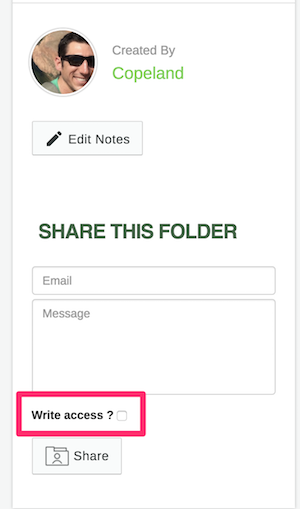
According to the instructions for GaiaGPS.com, there should be a "Write Access" check box when sharing a folder (step #4).. There is no such check box on my screen.
When I use my phone (Android), there is an option to grand access, but when I send the link to collaborators, they are still not able to add or edit waypoints in the folder.
I don't consider this a "Feature Request". It's in your instructions. Make it work.
I'll go on to say that in general the management of my data via the web page is pretty crappy. A lot of repeated clicking and scrolling makes it extremely tedious to effectively organize and edit waypoints and tracks. I think my kids could do a better job of coding.
-

Can you let me know which web browser you are using? On gaiagps.com, the “Write Access” should be displayed just above the “Share” button on the folder's data summary page.
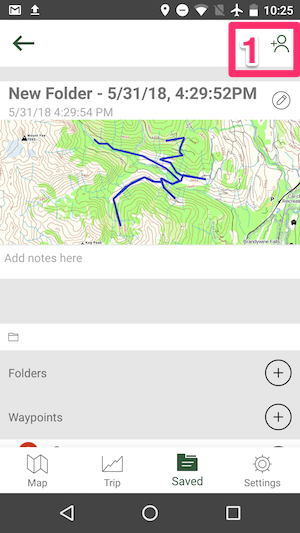
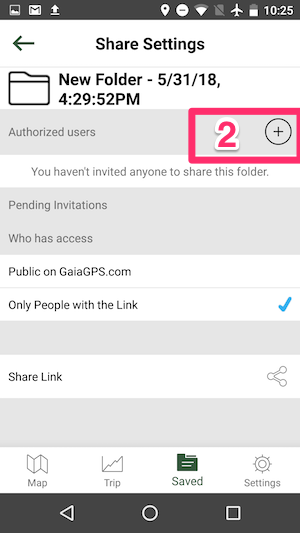
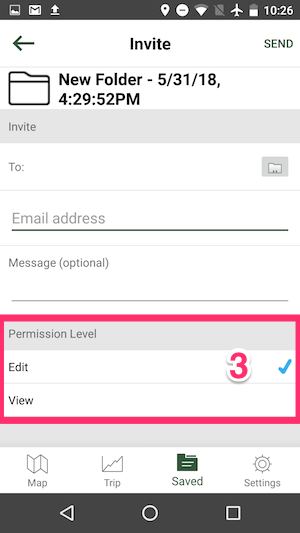
In the Android version of Gaia GPS, you can give editing permission for a shared folder by:
- Tap the Share icon on the details page for the folder
- Tap the “+” icon next to Authorized Users
- After entering an email address and change the Permission Level to “Edit”
 0
0
Please sign in to leave a comment.
Comments
1 comment