
Option to only use the 1:25000 IGN France tile set, even when zooming out

This applies to all platforms.
The IGN map is really useful when zoomed in (1:25000). However, when you zoom out a little, the view switches to a different tile set that is almost useless. It has absolutely no detail and you can't see the trails anymore.
While zooming out, and the useless tile set still needs to load, the app and website just keep showing the detailed 1:25000 tile set as placeholder. This view is WAY better!
It would be brilliant if there was an option to never use this coarse tile set at all, and instead just always zoom out on the detailed tileset. Then we could finally see the complete topo map, just as you would with a paper map.
This is the perfect 1:25000 IGN topo view, exactly the same as the paper map.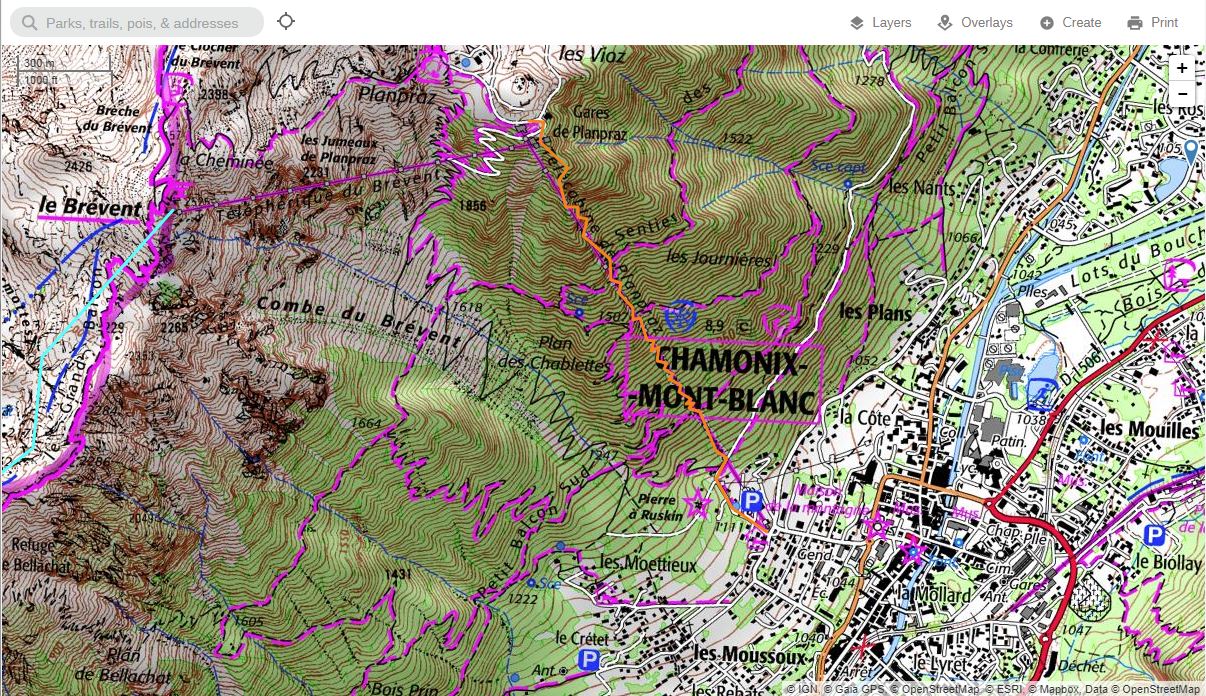
While zooming out, the app and website keep using this 1:25000 layer, while the new tiles load. This is perfect, because now we can get a better view of the trails.
But then, after a second of loading, this annoying tile set appears and all detail is lost. The trails disappear.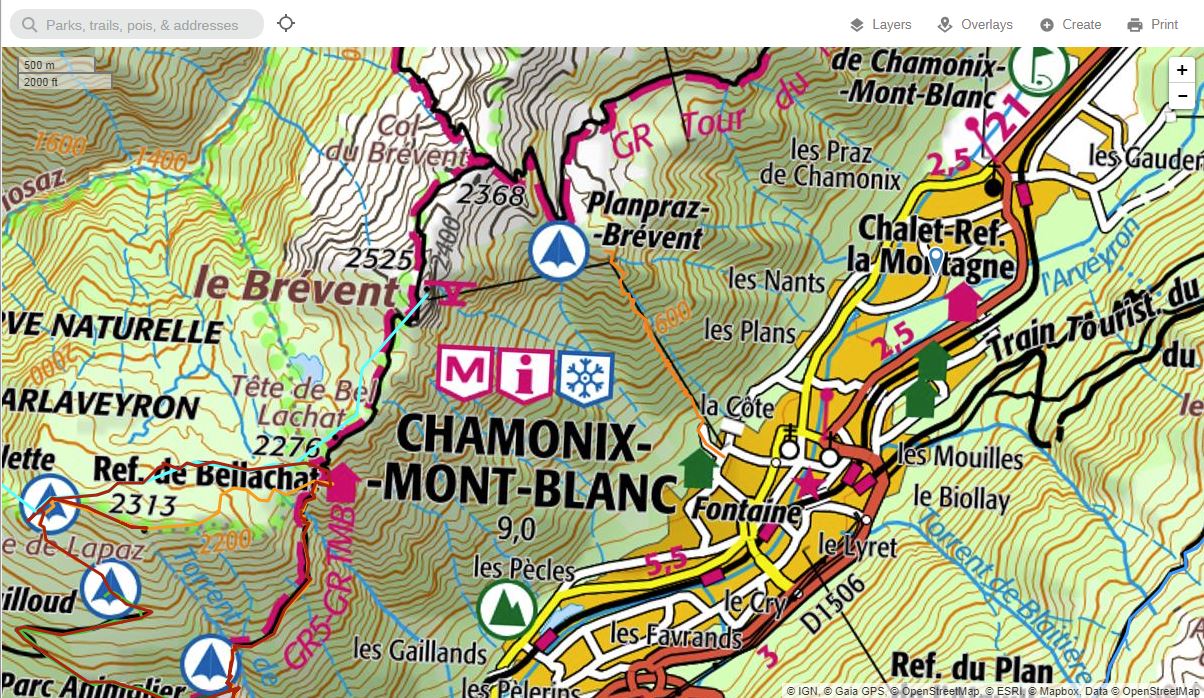
-

Thanks for your feedback on the France IGN layer. The zoom levels for the map tiles are set on the publisher's side, sorry about that.
0 -
Yes, but that doesn't mean you have to use all of them, right? In fact, if you can already zoom out on the high-res tiles while the low-res tiles load, then you can simply do the same and just never load the low-res tiles. It's super simple to code that, and it doesn't require any change or cooperation from the publisher.
It's like cakes in a bakery. Even though the cake publisher offers 3 sizes of cakes, you can still choose to just get multiple small ones instead of one big one.The only downside is that the user will be loading more high-res tiles, so the map will load a bit slower than before. This is a small downside I'd happily accept, and I think most other users will too. But it's best to keep it optional of course.
I'd propose to keep the current map layer as it is, and add a copy "IGN France 1:25000" that will only load the high-res tile set, and perhaps the very low-res tiles when you zoom out extremely far. And if ever you'd need this to perform better, you could simply generate and cache the low-res tiles sublayer by stitching 2x2 or 3x3 high-res tiles together and resize the result.0 -

Yeah, to echo this I'd much prefer to be able to select which tile set i'm viewing manually.
In web-viewer you can just zoom out on your browser (not changing the map zoom, just zoom out to 50% or whatever) to see more of the map. But this doesn't apply in the field.1 -
Browser zoom, clever! Didn't think of that, but at least that makes it more usable!
On the right is the 1:25000 map with the browser zoom. This is exactly the paper maps as I've bought them as well.
On the left is how GaiaGPS loads it normally. I don't know what this map is meant for, maybe it makes sense as a country roadmap for the highways. I'd never buy that map on paper and I don't think it belongs together with the topo map.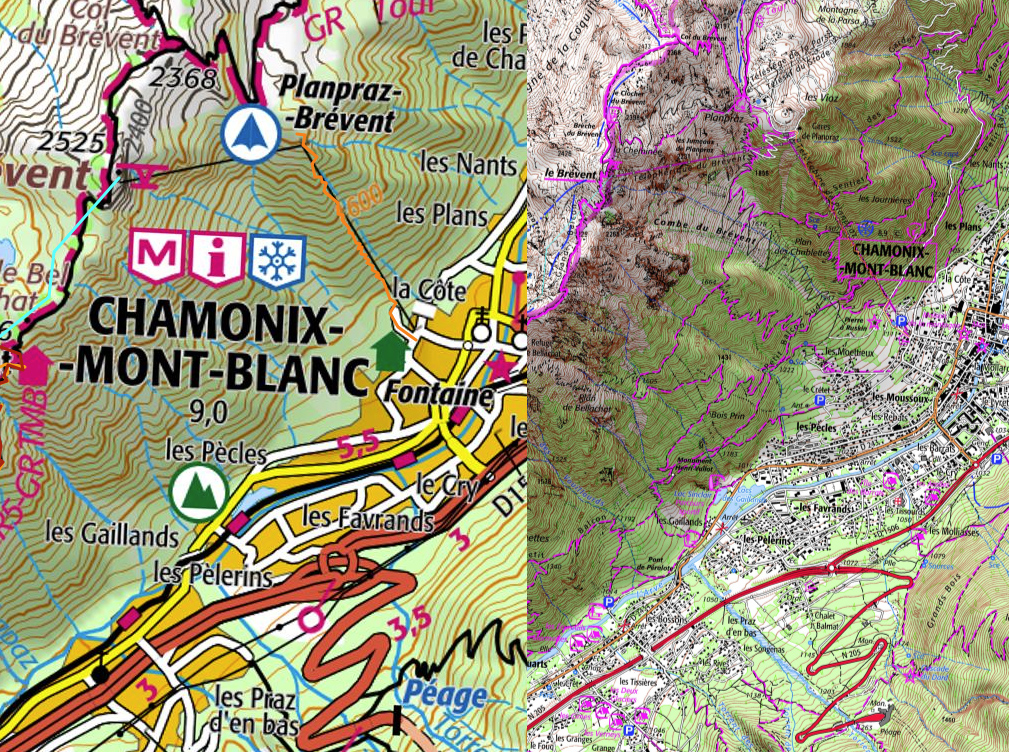 0
0 -

Hi all,
Thanks for your feedback.
It's possible that we'll be able to make these zoom levels configurable by later this year, but this would depend on first completing a larger project to replace the mapping framework currently being used at gaiagps.com/map.0
Please sign in to leave a comment.
Comments
5 comments