
How the heck do you edit and existing saved route?

I have a route that we walk/hike frequently. One short section of it got closed due to an unstable slope. I'd like to move a short section of the route to a nearby alternate. But my edit options (gaiagps.com) and the iOS app both seem pretty brain-damaged when I ask to edit the route...basically all either seems to let me do is add new waypoints with a route between them and the route start.
I can re-create the route on the web version by hand with the mods. But that's ridiculous. Is there some trick/method for deleting a section of a route and replacing it, or better yet, just dragging where it needs to go on the map?
-

I'm sorry you are having an issue editing your route. Can you click 'Submit a Request' above to contact the support team, and include a copy of the route?
-2 -

is there an answer for this issue. I had created a snap to trail route. post saving it one section changed from snap to trail to straight line. I would like to edit the saved route and repair this section. how can this be done? BTW this is on the gaiagps.com using safari.
1 -
@sgrundleger
You can follow these instructions to find your saved route and edit it: https://help.gaiagps.com/hc/en-us/articles/360006418233and
If you have any trouble feel free to click 'Submit a Request' and let me know the coordinates of the area and I'd be happy to assist you further.-3 -

I'm very interested in this discussion of route editing. I'm trying to create a field trip for geologists based on an old road guide where the stops were described in miles from a starting point. I want waypoints at the location of each stop from the guide. The route is about 1000 miles away, so going there and creating waypoints in the field is not an option.
When editing a route, the default is adding new waypoints to an existing route. As I drag the cursor, i see the distance from the starting point with the addition of the length of the line from the end of the route, which is not helpful. In the x, y graph of elevation versus distance, the distance scale is very coarse and does not help when I'm trying to plot waypoints within 0.1 mile accuracy.
So is there a way to track distance along route from start within a route for plotting stops. Thanks for any help you can give.
0 -
@surfsidepaul
When creating a route on gaiagps.com, you can click any of the routepoints or waypoints to view the distance from that point to the begin and the end of your route.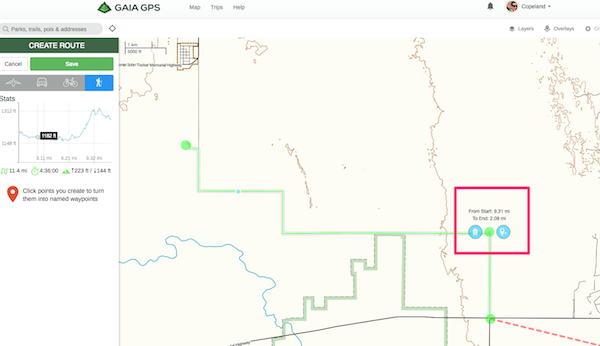 -1
-1 -

I find it hard to believe that this problem has been around for 5 years and still is not fixed. I have submitted a ticket as suggested above. Gaia responded suggesting that I try all of the things that I said in my ticket DON'T WORK. Like many in this thread, I an highly frustrated and amazed to see that this problem has been mentioned on several threads over the past FIVE YEARS and no fix. I have tried to edit my routes both on the desk top and devices. The device attempts now result in the app closing. C'mon Gaia, as a paying customer, I expect better.
2 -

I am wanting to have this resolved as well. When I try to edit a route and delete waypoints it is so frustrating when you can’t delete the waypoints unless you get your finger EXACTLY on the waypoint to delete it in order to create your new route. 5 years to fix this!! That is unacceptable. This is the first issue I have had with this app and am totally frustrated now.
0 -

The maps on Gaia are brilliant. Far more detailed than any other mapping software.However, the interface for planning routes needs a lot of work, it is not intuitive at all, it feels clunky and restrictive. I want to be able to drag any part of the route and easily assign waypoints to the route. Having to draw a new route everytime you want to change something is extremely frustrating. Judging by this comment thread, they don't seem to be developing the interface or listening to customer feedback. Its a real shame as it has so much potential.
0 -

GaiaGPS editing feels clunky, especially compared to intuitive drag-and-drop tools. Sadly, there’s no simple way to delete or replace a section—you’ll have to rebuild it. It’s frustrating, like editing “car parking multiplayer mod apk” tracks without checkpoints. Hopefully, future updates bring smarter route editing.
0
Please sign in to leave a comment.
Comments
9 comments