
New Data Public by Default - how do I turn this off
Answered
Unless I'm missing something, after I collect a track or waypoint in the field and view it on my browser at gaiagps.com, I find that the data are public by default. I thought they were supposed to be private by default. How do I change this?
-

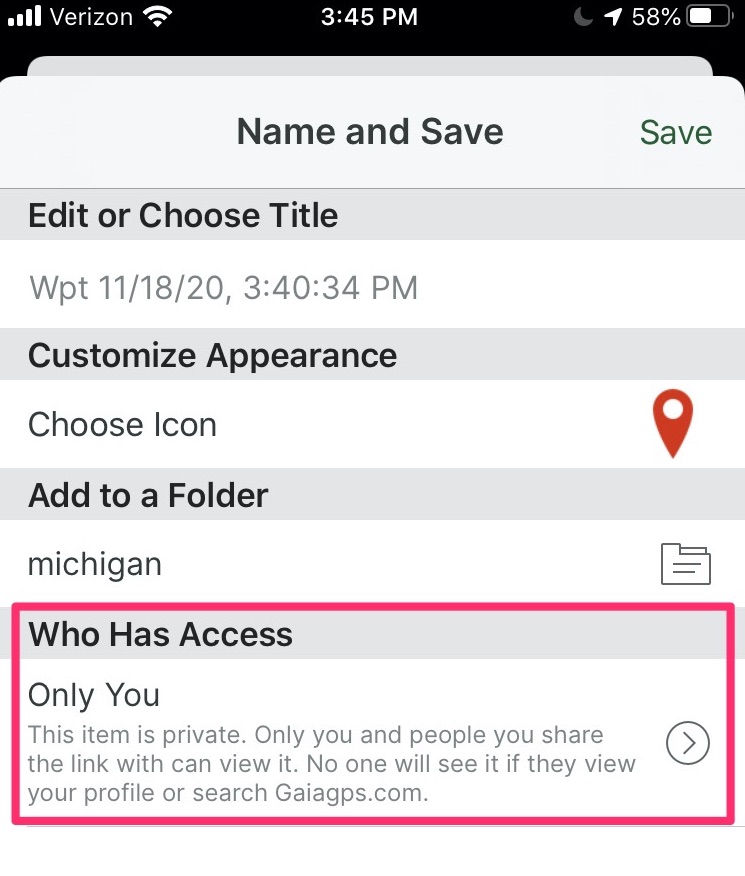
This can happen if you changed the "Who Has Access" button to "Everyone" after recording a track. This setting is sticky, so if you did it once it might still be set to post your tracks publicly.
After recording a track, on the "Name and Save" page, ensure you have "Who has access" set to "Only you".
 0
0 -
And if you have any existing data that's public that you'd like to make private you can do that like so:
iOS: Make your Tracks & Waypoints Public/Private
web: Make your Tracks, Routes, Waypoints, and Folders Public/Private from gaiagps.com0
Post is closed for comments.
Comments
2 comments