
where to login?

I have my iTunes receipt for purchase.
Using iphone 7+
when i press the Gaia icon, I immediately go to a map of where I am.
There is no login.
I can search for a location.
If I then click on the top right icon to get another map (satellite with labels), it says membership is required and takes me to "become a member" which I have already done (GPS member).
Seems I am missing the log into the system.
Where is it, or what am I missing on this app?
Many thanks!
Jim
-

Hi Jim,
You can tap the Settings button at the bottom of the screen to get more menu options. Then tap Account to find the login area.
1 -

Im not getting the icons across the bottom screen
0 -

Hi 3194317187,
If you aren't able to see the buttons at the bottom of the screen in the app, you may be in full-screen mode.
Tap the icon with 4 converging arrows to exit.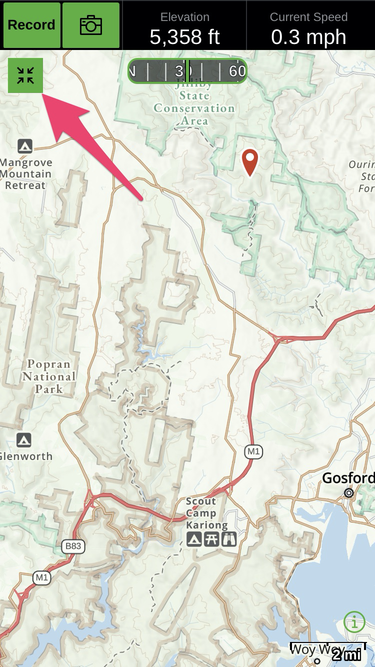
Once out of full-screen mode, follow these steps to login to the app:- Tap Settings (bottom right corner of map page) > your email will be listed under "Account".
- If not, tap Account > Log In > Have an account? Sign in.
I've also sent you an email related to this post and your other emailed questions.
If you have any other questions, please contact us through the Help button at the bottom of the page.0 -

I am having the same or a similar issue as above. I can log in on my computer and my phone but when I attempt to log in on my tablet it takes me directly to the map and says I have the free version. Both my other devises show my premium membership. I loged out, uninstalled the app, changed my password and resetup everything 2 separat times but my tablet still has me as a free user. What can I do next?
0 -

It sounds like you may need to restore your purchase.
- Open Gaia GPS > Settings > your email will be listed under "Account".
- If not, tap the Account > Log In > Have an account? Sign in.
- Then, return to the Account screen and tap "Restore Purchases"
You should see your membership listed under "Subscription".
0
Please sign in to leave a comment.
Comments
5 comments